call_end

    • Pl chevron_right

      Sriram Ramkrishna: GNOME OS Hackfest During FOSDEM week

      news.movim.eu / PlanetGnome • 17 January 2026

    For those of you who are attending FOSDEM, we’re doing a GNOME OS hackfest and invite those of you who might be interested on our experiments on concepts as the ‘anti-distro’, eg an OS with no distro packaging that integrates GNOME desktop patterns directly.

    The hackfest is from January 28th – January 29th. If you’re interested, feel free to respond on the comments. I don’t have an exact location yet.

    We’ll likely have some kind of BigBlueButton set up so if you’re not available to come in-person you can join us remotely.

    Agenda and attendees are linked here here.

    There is likely a limited capacity so acceptance will be “first come, first served”.

    See you there!

    • Pl chevron_right

      Gedit Technology: gedit 49.0 released

      news.movim.eu / PlanetGnome • 16 January 2026 • 3 minutes

    gedit 49.0 has been released! Here are the highlights since version 48.0 which dates back from September 2024. (Some sections are a bit technical).

    File loading and saving enhancements

    A lot of work went into this area. It's mostly under-the-scene changes where there was a lot of dusty code. It's not entirely finished, but there are already user-visible enhancements:

    • Loading a big file is now much faster.
    • gedit now refuses to load very big files, with a configurable limit ( more details ).

    Improved preferences

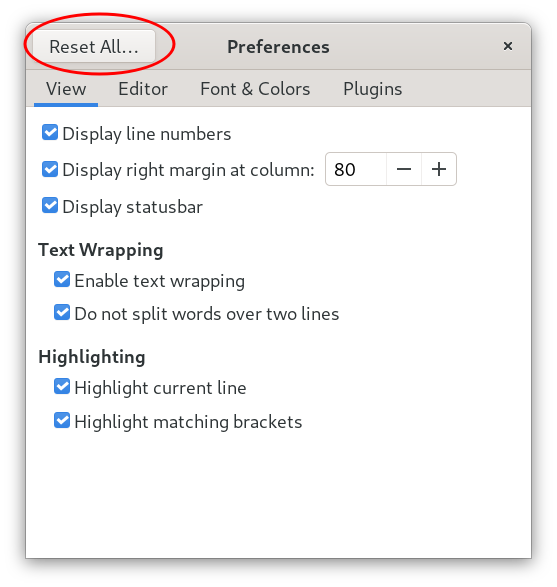
    gedit screenshot - reset all preferences

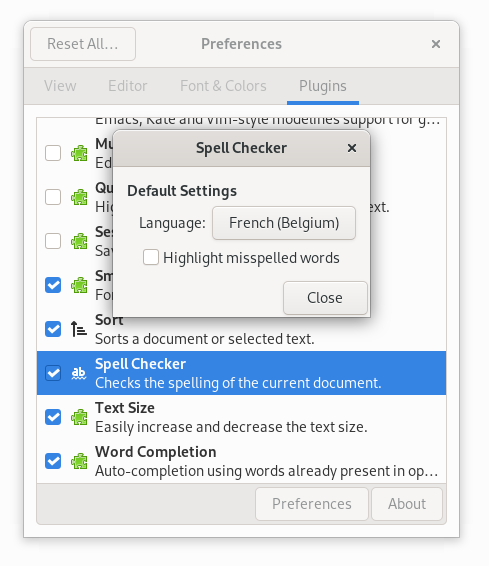
    gedit screenshot - spell-checker preferences

    There is now a "Reset All..." button in the Preferences dialog. And it is now possible to configure the default language used by the spell-checker.

    Python plugins removal

    Initially due to an external factor, plugins implemented in Python were no longer supported.

    During some time a previous version of gedit was packaged in Flathub in a way that still enabled Python plugins, but it is no longer the case.

    Even though the problem is fixable, having some plugins in Python meant to deal with a multi-language project, which is much harder to maintain for a single individual. So for now it's preferable to keep only the C language.

    So the bad news is that Python plugins support has not been re-enabled in this version, not even for third-party plugins.

    More details .

    Summary of changes for plugins

    The following plugins have been removed:

    • Bracket Completion
    • Character Map
    • Color Picker
    • Embedded Terminal
    • Join/Split Lines
    • Multi Edit
    • Session Saver

    Only Python plugins have been removed, the C plugins have been kept. The Code Comment plugin which was written in Python has been rewritten in C, so it has not disappeared. And it is planned and desired to bring back some of the removed plugins.

    Summary of other news

    • Lots of code refactorings have been achieved in the gedit core and in libgedit-gtksourceview.
    • A better support for Windows.
    • Web presence at gedit-text-editor.org: new domain name and several iterations on the design.
    • A half-dozen Gedit Development Guidelines documents have been written.

    Wrapping-up statistics for 2025

    The total number of commits in gedit and gedit-related git repositories in 2025 is: 884. More precisely:

    138	enter-tex
    310	gedit
    21	gedit-plugins
    10	gspell
    4	libgedit-amtk
    41	libgedit-gfls
    290	libgedit-gtksourceview
    70	libgedit-tepl
    

    It counts all contributions, translation updates included.

    The list contains two apps, gedit and Enter TeX . The rest are shared libraries (re-usable code available to create other text editors).

    If you do a comparison with the numbers for 2024 , you'll see that there are fewer commits, the only module with more commits is libgedit-gtksourceview. But 2025 was a good year nevertheless!

    For future versions: superset of the subset

    With Python plugins removed, the new gedit version is a subset of the previous version, when comparing approximately the list of features. In the future, we plan to have a superset of the subset . That is, to bring in new features and try hard to not remove any more functionality.

    In fact, we have reached a point where we are no longer interested to remove any more features from gedit. So the good news is that gedit will normally be incrementally improved from now on without major regressions. We really hope there won't be any new bad surprises due to external factors!

    Side note: this "superset of the subset" resembles the evolution of C++, but in the reverse order. Modern C++ will be a subset of the superset to have a language in practice (but not in theory) as safe as Rust (it works with compiler flags to disable the unsafe parts).

    Onward to 2026

    Since some plugins have been removed, this makes gedit a less advanced text editor. It has become a little less suitable for heavy programming workloads, but for that there are lots of alternatives.

    Instead, gedit could become a text editor of choice for newcomers in the computing science field (students and self-learners). It can be a great tool for markup languages too. It can be your daily companion for quite a while, until your needs evolve for something more complete at your workplace. Or it can be that you prefer its simplicity and its not-going-in-the-way default setup, plus the fact that it launches quickly. In short, there are a lot of reasons to still love gedit ❤️ !

    If you have any feedback, even for a small thing, I would like to hear from you :) ! The best places are on GNOME Discourse, or GitLab for more actionable tasks (see the Getting in Touch section).

    • Pl chevron_right

      Ignacio Casal Quinteiro: Mecalin

      news.movim.eu / PlanetGnome • 15 January 2026 • 2 minutes

    Many years ago when I was a kid, I took typing lessons where they introduced me to a program called Mecawin . With it, I learned how to type, and it became a program I always appreciated not because it was fancy, but because it showed step by step how to work with a keyboard.

    Now the circle of life is coming back: my kid will turn 10 this year. So I started searching for a good typing tutor for Linux. I installed and tried all of them, but didn’t like any. I also tried a couple of applications on macOS, some were okish, but they didn’t work properly with Spanish keyboards. At this point, I decided to build something myself. Initially, I  hacked out keypunch, which is a very nice application, but I didn’t like the UI I came up with by modifying it. So in the end, I decided to write my own. Or better yet, let Kiro write an application for me.

    Mecalin is meant to be a simple application. The main purpose is teaching people how to type, and the Lessons view is what I’ll be focusing on most during development. Since I don’t have much time these days for new projects. I decided to take this opportunity to use Kiro to do most of the development for me. And to be honest, it did a pretty good job. Sure, there are things that could be better, but I definitely wouldn’t have finished it in this short time otherwise.

    So if you are interested, give it a try, go to flathub and install it: https://flathub.org/apps/io.github.nacho.mecalin

    In this application, you’ll have several lessons that guide you step by step through the different rows of the keyboard, showing you what to type and how to type it.

    This is an example of the lesson view.

    You also have games.

    The falling keys game: keys fall from top to bottom, and if one reaches the bottom of the window, you lose. This game can clearly be improved, and if anybody wants to enhance it, feel free to send a PR.

    The scrolling lanes game: you have 4 rows where text moves from right to left. You need to type the words before they reach the leftmost side of the window, otherwise you lose.

    For those who want to support your language, there are two JSON files you’ll need to add:

    1. The keyboard layout: https://github.com/nacho/mecalin/tree/main/data/keyboard_layouts
    2. The lessons: https://github.com/nacho/mecalin/tree/main/data/lessons

    Note that the Spanish lesson is the source of truth; the English one is just a translation done by Kiro.

    If you have any questions, feel free to contact me.

    • Pl chevron_right

      Flathub: What's new in Vorarbeiter

      news.movim.eu / PlanetGnome • 14 January 2026 • 2 minutes

    It is almost a year since the switch to Vorarbeiter for building and publishing apps. We've made several improvements since then, and it's time to brag about them.

    RunsOn

    In the initial announcement, I mentioned we were using RunsOn , a just-in-time runner provisioning system, to build large apps such as Chromium. Since then, we have fully switched to RunsOn for all builds. Free GitHub runners available to open source projects are heavily overloaded and there are limits on how many concurrent builds can run at a time. With RunsOn, we can request an arbitrary number of threads, memory and disk space, for less than if we were to use paid GitHub runners.

    We also rely more on spot instances, which are even cheaper than the usual on demand machines. The downside is that jobs sometimes get interrupted. To avoid spending too much time on retry ping-pong, builds retried with the special bot, retry command use the on-demand instances from the get-go. The same catch applies to large builds, which are unlikely to finish in time before spot instances are reclaimed.

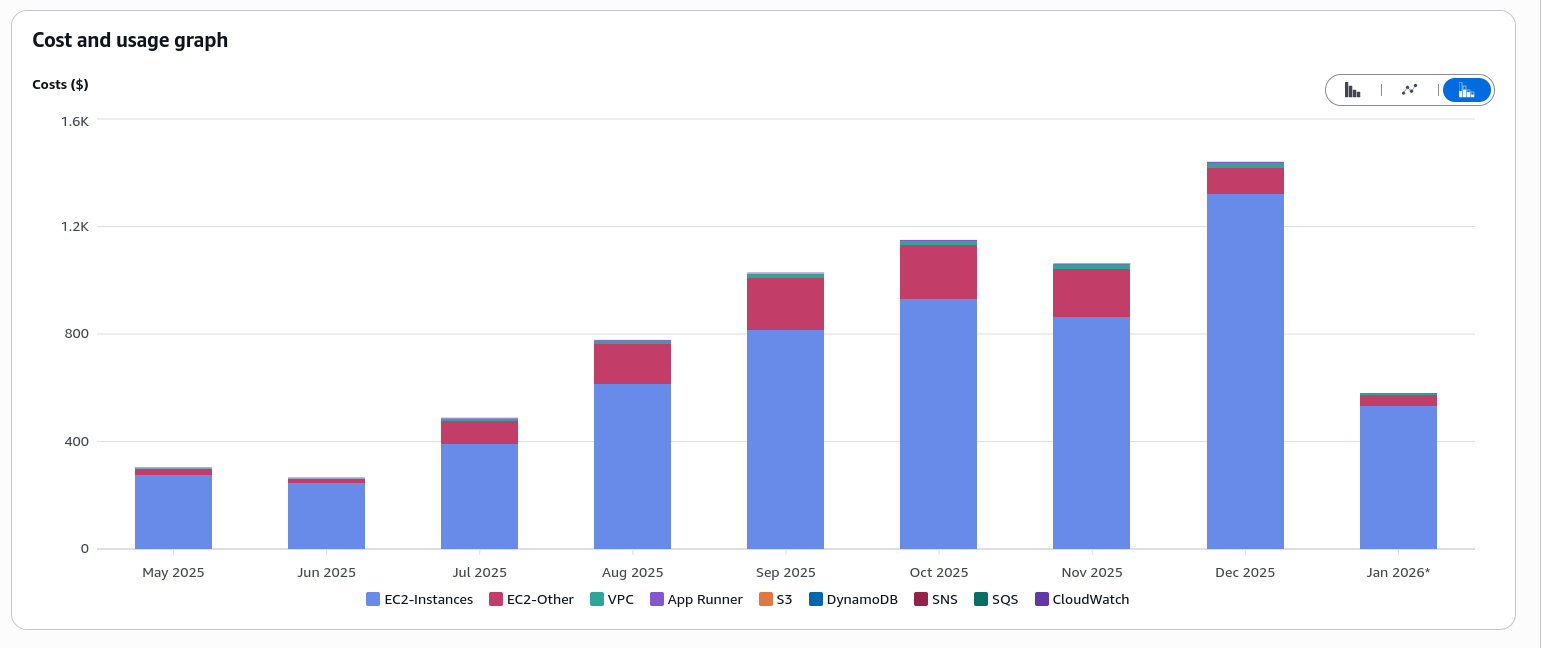
    The cost breakdown since May 2025 is as follows:

    Cost breakdown

    Once again, we are not actually paying for anything thanks to the AWS credits for open source projects program . Thank you RunsOn team and AWS for making this possible!

    Caching

    Vorarbeiter now supports caching downloads and ccache files between builds. Everything is an OCI image if you are feeling brave enough, and so we are storing the per-app cache with ORAS in GitHub Container Registry.

    This is especially useful for cosmetic rebuilds and minor version bumps, where most of the source code remains the same. Your mileage may vary for anything more complex.

    End-of-life without rebuilding

    One of the Buildbot limitations was that it was difficult to retrofit pull requests marking apps as end-of-life without rebuilding them. Flat-manager itself exposes an API call for this since 2019 but we could not really use it, as apps had to be in a buildable state only to deprecate them.

    Vorarbeiter will now detect that a PR modifies only the end-of-life keys in the flathub.json file, skip test and regular builds, and directly use the flat-manager API to republish the app with the EOL flag set post-merge.

    Web UI

    GitHub's UI isn't really built for a centralized repository building other repositories. My love-hate relationship with Buildbot made me want to have a similar dashboard for Vorarbeiter.

    The new web UI uses PicoCSS and HTMX to provide a tidy table of recent builds. It is unlikely to be particularly interesting to end users, but kinkshaming is not nice, okay? I like to know what's being built and now you can too here .

    Reproducible builds

    We have started testing binary reproducibility of x86_64 builds targetting the stable repository. This is possible thanks to flathub-repro-checker , a tool doing the necessary legwork to recreate the build environment and compare the result of the rebuild with what is published on Flathub.

    While these tests have been running for a while now, we have recently restarted them from scratch after enabling S3 storage for diffoscope artifacts. The current status is on the reproducible builds page .

    Failures are not currently acted on. When we collect more results, we may start to surface them to app maintainers for investigation. We also don't test direct uploads at the moment.

    • Pl chevron_right

      Arun Raghavan: Accessibility Update: Enabling Mono Audio

      news.movim.eu / PlanetGnome • 13 January 2026 • 2 minutes

    If you maintain a Linux audio settings component, we now have a way to globally enable/disable mono audio for users who do not want stereo separation of their audio (for example, due to hearing loss in one ear). Read on for the details on how to do this.

    Background

    Most systems support stereo audio via their default speaker output or 3.5mm analog connector. These devices are exposed as stereo devices to applications, and applications typically render stereo content to these devices.

    Visual media use stereo for directional cues, and music is usually produced using stereo effects to separate instruments, or provide a specific experience.

    It is not uncommon for modern systems to provide a “mono audio” option that allows users to have all stereo content mixed together and played to both output channels. The most common scenario is hearing loss in one ear.

    PulseAudio and PipeWire have supported forcing mono audio on the system via configuration files for a while now. However, this is not easy to expose via user interfaces, and unfortunately remains a power-user feature.

    Implementation

    Recently, Julian Bouzas implemented a WirePlumber setting to force all hardware audio outputs (MR 721 and 769 ). This lets the system run in stereo mode, but configures the audioadapter around the device node to mix down the final audio to mono.

    This can be enabled using the WirePlumber settings via API, or using the command line with:

    wpctl settings node.features.audio.mono true

    The WirePlumber settings API allows you to query the current value as well as clear the setting and restoring to the default state.

    I have also added (MR 2646 and 2655 ) a mechanism to set this using the PulseAudio API (via the messaging system). Assuming you are using pipewire-pulse , PipeWire’s PulseAudio emulation daemon, you can use pa_context_send_message_to_object() or the command line:

    pactl send-message /core pipewire-pulse:force-mono-output true

    This API allows for a few things:

    • Query existence of the feature: when an empty message body is sent, if a null value is returned, feature is not supported
    • Query current value: when an empty message body is sent, the current value ( true or false ) is returned if the feature is supported
    • Setting a value: the requested setting ( true or false ) can be sent as the message body
    • Clearing the current value: sending a message body of null clears the current setting and restores the default

    Looking ahead

    This feature will become available in the next release of PipeWire (both 1.4.10 and 1.6.0).

    I will be adding a toggle in Pavucontrol to expose this, and I hope that GNOME, KDE and other desktop environments will be able to pick this up before long.

    Hit me up if you have any questions!

    • Pl chevron_right

      Zoey Ahmed: Welcome To The Coven!

      news.movim.eu / PlanetGnome • 12 January 2026 • 5 minutes

    Introduction §

    Welcome to the long-awaited rewrite of my personal blog!

    It’s been 2 years since I touched the source code for my original website , and unfortunately in that time it’s fallen into decay, the source code sitting untouched for some time for a multitude of reasons.

    One of the main reasons for undertaking a re-write is I have changed a lot in the two years since I first started having my own blog. I have gained 2 years of experience and knowledge in fields like accessibility and web development, I became a regular contributor to the GNOME ecosystem, especially in the last half of 2025, I picked up playing music for myself and with friends in late 2024. I am now (thankfully) out as a transgender woman to everyone in my life, and can use my website as a proper portfolio, rather then just as a nice home page for my friends to whom I was out the closet to. I began University in 2024 and gained a lot of web design experience in my second year , creating 2 (pretty nice) new websites in a short period for my group. In short, my previous website did not really reflect me or my passions anymore, and it sat untouched as the changes in my life added up.

    Another reason I undertook a rewrite was due to the frankly piss-poor architecture of my original website. My original website was all hand-written HTML and CSS! After it expanded a little, I tried to port what I had done with handwritten HTML/CSS to Zola , a static site generator. A static site generator, for those unfamiliar with the term, is a tool that takes markdown files, and some template and configuration files, and compiles them all into a set of static websites. In short, cutting down on the boilerplate and repeated code I would need to type every-time I made a new blog or subpage on my blog.

    I undertook the port to Zola in an attempt to make it easier to add new content to my blog, but it resulted in my website not taking full capability of the advantages of using a static site generator. I also disliked some parts about Zola, compared to other options like Jekyll and (the static site generator I eventually used in the rewrite) Hugo.

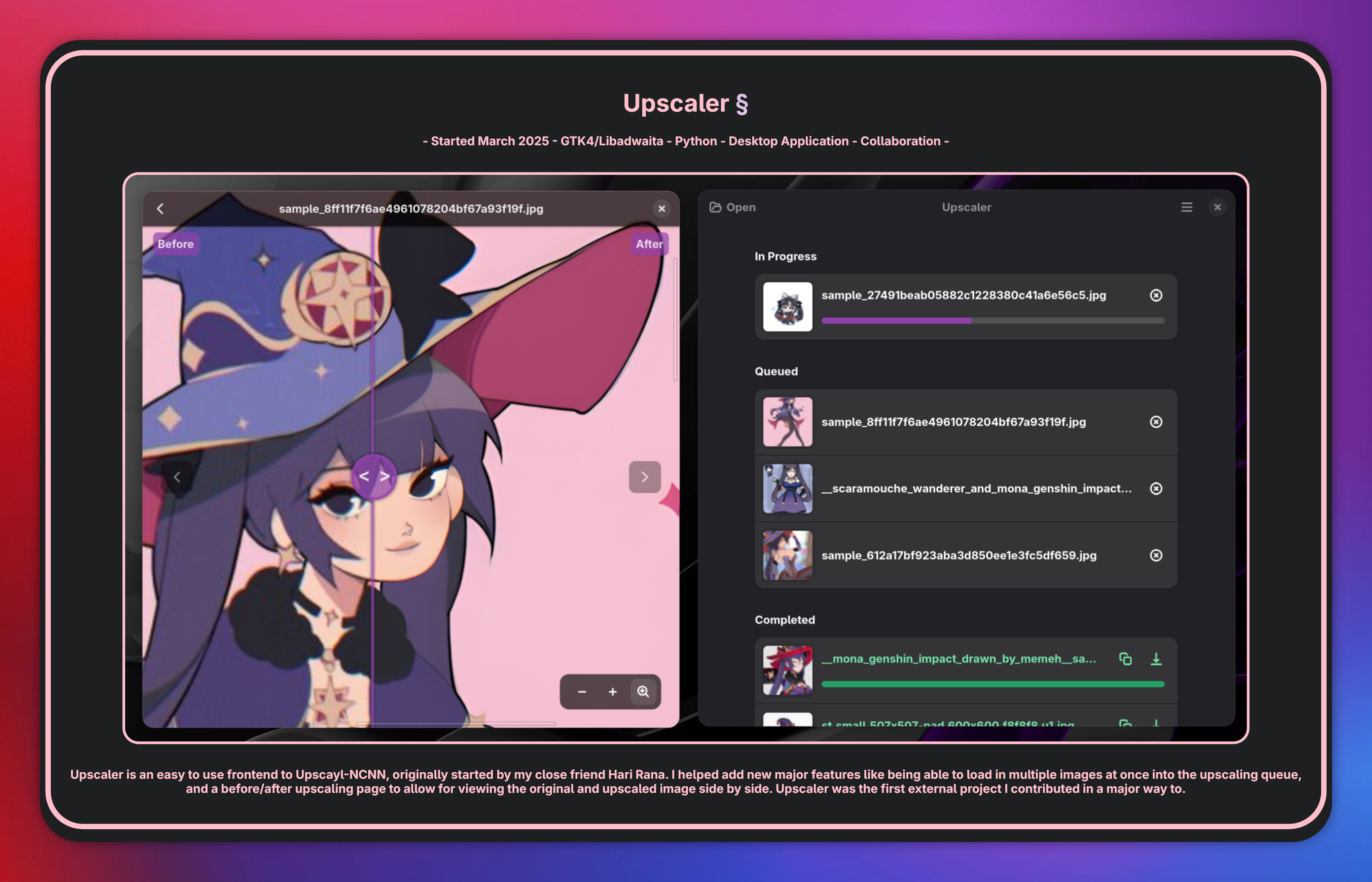
    On May 8th, 2025 I started rewriting my website, after creating a few designs in Penpot and getting feedback for their design by my close friends. This first attempt got about 80% to completion, but sat as I ran into a couple issues with making my website, and was overall unhappy with how some of the elements in my original draft of the rewrite came to fruition. One example was my portfolio:

    My old portfolio for Upscaler. It contains an image with 2 Upscaler windows, the image comparison mode in the left window, and the queue in the right window, with a description underneath. A pink border around it surrounds the image and description, with the project name and tags above the border My old portfolio for Upscaler. It contains an image with 2 Upscaler windows, the image comparison mode in the left window, and the queue in the right window, with a description underneath. A pink border around it surrounds the image and description, with the project name and tags above the border

    My old portfolio for Upscaler. It contains an image with 2 Upscaler windows, the image comparison mode in the left window, and the queue in the right window, with a description underneath. A pink border around it surrounds the image and description, with the project name and tags above the border

    I did not like the style of surrounding everything in large borders, the every portfolio item alternating between pink/purple was incredibly hard to do, and do well. I also didn’t take full advantage of things like subgrids in CSS, to allow me to make elements that were the full width of the page, while keeping the rest of the content dead centre.

    I also had trouble with making my page mobile responsive. I had a lot of new ideas for my blog, but never had time to get round to any of them, because I had to spend most my development time squashing bugs as I refactored large chunks of my website as my knowledge on Hugo and web design rapidly grew. I eventually let the rewrite rot for a few months, all while my original website was actually taken down for indefinite maintenance by my original hosting organization.

    On Janurary 8th, 2026 , exactly 7 months after the rewrite was started, I picked up it up again, starting more or less from scratch, but resuing some components and most of the content from the first rewrite. I was armed with all the knowledge from my university group project’s websites, and inspired by my fellow GNOME contributors websites, including but not limited to:

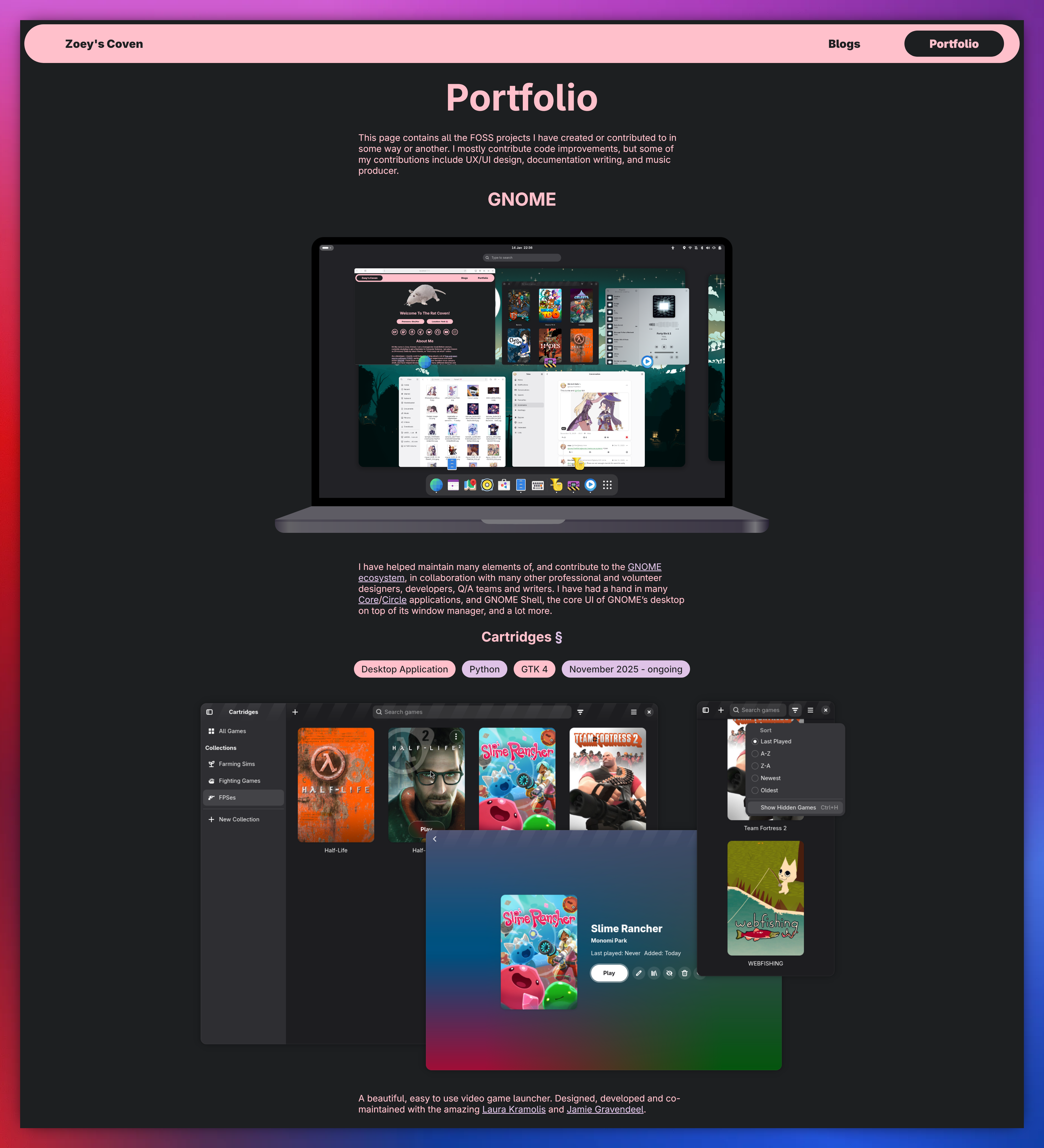
    In just a couple of days, I managed to create something I was much more proud of. This can be seen within my portfolio page , for example:

    A screenshot of the top of portfolio page, with the laptop running GNOME and the section for Cartridges. A screenshot of the top of portfolio page, with the laptop running GNOME and the section for Cartridges.

    A screenshot of the top of portfolio page, with the laptop running GNOME and the section for Cartridges.

    I also managed to add many features and improvements I did not manage to first time around (all done with HTML/CSS, no Javascript!) such as a proper mobile menu, with animated drop downs and an animation playing when the button is clicked, a list of icons for my smaller GNOME contributions , instead of having an entire item dedicated to each, wasting vertical space, an adaptive friends of the site grid , and a cute little graphical of GNOME on a laptop at the top of my portfolio in the same style as Tobias Bernard’s and GNOME’s front page, screenshots switching from light/dark mode in the portfolio based on the users OS preferences and more.

    Overall, I am very proud of not only the results of my second rewriter, but how I managed to complete it in less than a week. I am happy to finally have a permanent place to call my own again, and share my GNOME development and thoughts in a place thats more collected and less ephemeral than something like my Fediverse account or (god forbid) a Bluesky or X account. Still, I have more work to do on my website front, like a proper light mode as pointed out by The Evil Skeleton , and to clean up my templates and 675 line long CSS file!

    For now, welcome to the re-introduction of my small area of the Internet, and prepare for yet another development blog by a GNOME developer.

    • Pl chevron_right

      Engagement Team: GNOME ASIA 2025-Event Report

      news.movim.eu / PlanetGnome • 9 January 2026 • 1 minute

    GNOME ASIA 2025 took place in Tokyo, Japan, from 13–14 December 2025 , bringing together the GNOME community for the featured annual GNOME conference in Asia.
    The event was held in a hybrid format, welcoming both in-person and online speakers and attendees from across the world.

    GNOME ASIA 2025 was co-hosted with the LibreOffice Asia Conference community event , creating a shared space for collaboration and discussion between open-source communities.

    Photo by Tetsuji Koyama, licensed under CC BY 4.0

    About GNOME.Asia Summit

    The GNOME.Asia Summit focuses primarily on the GNOME desktop while also covering applications and platform development tools. It brings together users, developers, foundation leaders, governments, and businesses in Asia to discuss current technologies and future developments within the GNOME ecosystem.

    The event featured 25 speakers in total , delivering 17 full talks and 8 lightning talks across the two days. Speakers joined both on-site and remotely.

    Photo by Tetsuji Koyama, licensed under CC BY 4.0

    Around 100 participants attended in person in Tokyo, contributing to engaging discussions and community interaction. Session recordings were published on the GNOME Asia YouTube channel , where they have received 1,154 total views , extending the reach of the event beyond the conference dates.

    With strong in-person attendance, active online participation, and collaboration with the LibreOffice Asia community, GNOME ASIA 2025 once again demonstrated the importance of regional gatherings in strengthening the GNOME ecosystem and open-source collaboration in Asia.

    Photo by Tetsuji Koyama, licensed under CC BY 4.0

    • Pl chevron_right

      Daiki Ueno: GNOME.Asia Summit 2025

      news.movim.eu / PlanetGnome • 7 January 2026 • 2 minutes

    Last month, I attended the GNOME.Asia Summit 2025 held at the IIJ office in Tokyo. This was my fourth time attending the summit, following previous events in Taipei (2010), Beijing (2015), and Delhi (2016).

    As I live near Tokyo, this year’s conference was a unique experience for me: an opportunity to welcome the international GNOME community to my home city rather than traveling abroad. Reconnecting with the community after several years provided a helpful perspective on how our ecosystem has evolved.

    Addressing the post-quantum transition

    During the summit, I delivered a keynote address regarding post-quantum cryptography (PQC) and desktop. The core of my presentation focused on the “Harvest Now, Decrypt Later” (HNDL) type of threats, where encrypted data is collected today with the intent of decrypting it once quantum computing matures. The talk was followed by the history and the current status of PQC support in crypto libraries including OpenSSL, GnuTLS, and NSS, and concluded with the next steps recommended for the users and developers.

    It is important to recognize that classical public key cryptography, which is vulnerable to quantum attacks, is integrated into nearly every aspect of the modern desktop: from secure web browsing and apps using libsoup (Maps, Weather, etc.) to the underlying verification of system updates. Given that major government timelines (such as NIST and the NSA’s CNSA 2.0 ) are pushing for a full migration to quantum-resistant algorithms between 2027 and 2035, the GNU/Linux desktop should prioritize “crypto-agility” to remain secure in the coming decade.

    From discussion to implementation: Crypto Usage Analyzer

    One of the tools I discussed during my talk was crypto-auditing , a project designed to help developers identify and update the legacy cryptography usage. At the time of the summit, the tool was limited to a command-line interface, which I noted was a barrier to wider adoption.

    Inspired by the energy of the summit, I spent part of the recent holiday break developing a GUI for crypto-auditing. By utilizing AI-assisted development tools, I was able to rapidly prototype an application, which I call “Crypto Usage Analyzer” , that makes the auditing data more accessible.

    Conclusion

    The summit in Tokyo had a relatively small audience, which resulted in a cozy and professional atmosphere. This smaller scale proved beneficial for technical exchange, as it allowed for focused discussions on desktop-related topics than is often possible at larger conferences.

    Attending GNOME.Asia 2025 was a reminder of the steady work required to keep the desktop secure and relevant. I appreciate the efforts of the organizing committee in bringing the summit to Tokyo, and I look forward to continuing my work on making security libraries and tools more accessible for our users and developers.

    • Pl chevron_right

      Sebastian Wick: Improving the Flatpak Graphics Drivers Situation

      news.movim.eu / PlanetGnome • 5 January 2026 • 6 minutes

    Graphics drivers in Flatpak have been a bit of a pain point. The drivers have to be built against the runtime to work in the runtime. This usually isn’t much of an issue but it breaks down in two cases:

    1. If the driver depends on a specific kernel version
    2. If the runtime is end-of-life (EOL)

    The first issue is what the proprietary Nvidia drivers exhibit. A specific user space driver requires a specific kernel driver. For drivers in Mesa, this isn’t an issue. In the medium term, we might get lucky here and the Mesa-provided Nova driver might become competitive with the proprietary driver. Not all hardware will be supported though, and some people might need CUDA or other proprietary features, so this problem likely won’t go away completely.

    Currently we have runtime extensions for every Nvidia driver version which gets matched up with the kernel version, but this isn’t great.

    The second issue is even worse, because we don’t even have a somewhat working solution to it. A runtime which is EOL doesn’t receive updates, and neither does the runtime extension providing GL and Vulkan drivers. New GPU hardware just won’t be supported and the software rendering fallback will kick in.

    How we deal with this is rather primitive: keep updating apps, don’t depend on EOL runtimes. This is in general a good strategy. A EOL runtime also doesn’t receive security updates, so users should not use them. Users will be users though and if they have a goal which involves running an app which uses an EOL runtime, that’s what they will do. From a software archival perspective, it is also desirable to keep things working, even if they should be strongly discouraged.

    In all those cases, the user most likely still has a working graphics driver, just not in the flatpak runtime, but on the host system. So one naturally asks oneself: why not just use that driver?

    That’s a load-bearing “just”. Let’s explore our options.

    Exploration

    Attempt #1: Bind mount the drivers into the runtime.

    Cool, we got the driver’s shared libraries and ICDs from the host in the runtime. If we run a program, it might work. It might also not work. The shared libraries have dependencies and because we are in a completely different runtime than the host, they most likely will be mismatched. Yikes.

    Attempt #2: Bind mount the dependencies.

    We got all the dependencies of the driver in the runtime. They are satisfied and the driver will work. But your app most likely won’t. It has dependencies that we just changed under its nose. Yikes.

    Attempt #3: Linker magic.

    Until here everything is pretty obvious, but it turns out that linkers are actually quite capable and support what’s called linker namespaces . In a single process one can load two completely different sets of shared libraries which will not interfere with each other. We can bind mount the host shared libraries into the runtime, and dlmopen the driver into its own namespace. This is exactly what libcapsule does. It does have some issues though, one being that the libc can’t be loaded into multiple linker namespaces because it manages global resources. We can use the runtime’s libc, but the host driver might require a newer libc. We can use the host libc, but now we contaminate the apps linker namespace with a dependency from the host.

    Attempt #4: Virtualization.

    All of the previous attempts try to load the host shared objects into the app. Besides the issues mentioned above, this has a few more fundamental issues:

    1. The Flatpak runtimes support i386 apps; those would require a i386 driver on the host, but modern systems only ship amd64 code.
    2. We might want to support emulation of other architectures later
    3. It leaks an awful lot of the host system into the sandbox
    4. It breaks the strict separation of the host system and the runtime

    If we avoid getting code from the host into the runtime, all of those issues just go away, and GPU virtualization via Virtio-GPU with Venus allows us to do exactly that.

    The VM uses the Venus driver to record and serialize the Vulkan commands, sends them to the hypervisor via the virtio-gpu kernel driver. The host uses virglrenderer to deserializes and executes the commands.

    This makes sense for VMs, but we don’t have a VM, and we might not have the virtio-gpu kernel module, and we might not be able to load it without privileges. Not great.

    It turns out however that the developers of virglrenderer also don’t want to have to run a VM to run and test their project and thus added vtest, which uses a unix socket to transport the commands from the mesa Venus driver to virglrenderer.

    It also turns out that I’m not the first one who noticed this, and there is some glue code which allows Podman to make use of virgl .

    You can most likely test this approach right now on your system by running two commands:

    rendernodes=(/dev/dri/render*)
    virgl_test_server --venus --use-gles --socket-path /tmp/flatpak-virgl.sock --rendernode "${rendernodes[0]}" &
    flatpak run --nodevice=dri --filesystem=/tmp/flatpak-virgl.sock --env=VN_DEBUG=vtest --env=VTEST_SOCKET_NAME=/tmp/flatpak-virgl.sock org.gnome.clocks
    

    If we integrate this well, the existing driver selection will ensure that this virtualization path is only used if there isn’t a suitable driver in the runtime.

    Implementation

    Obviously the commands above are a hack. Flatpak should automatically do all of this, based on the availability of the dri permission.

    We actually already start a host program and stop it when the app exits: xdg-dbus-proxy . It’s a bit involved because we have to wait for the program (in our case virgl_test_server ) to provide the service before starting the app. We also have to shut it down when the app exits, but flatpak is not a supervisor. You won’t see it in the output of ps because it just execs bubblewrap ( bwrap ) and ceases to exist before the app even started. So instead we have to use the kernel’s automatic cleanup of kernel resources to signal to virgl_test_server that it is time to shut down.

    The way this is usually done is via a so called sync fd . If you have a pipe and poll the file descriptor of one end, it becomes readable as soon as the other end writes to it, or the file description is closed. Bubblewrap supports this kind of sync fd : you can hand in a one end of a pipe and it ensures the kernel will close the fd once the app exits.

    One small problem: only one of those sync fds is supported in bwrap at the moment, but we can add support for multiple in Bubblewrap and Flatpak .

    For waiting for the service to start, we can reuse the same pipe, but write to the other end in the service, and wait for the fd to become readable in Flatpak, before exec’ing bwrap with the same fd. Also not too much code .

    Finally, virglrenderer needs to learn how to use a sync fd . Also pretty trivial . There is an older MR which adds something similar for the Podman hook, but it misses the code which allows Flatpak to wait for the service to come up, and it never got merged.

    Overall, this is pretty straight forward.

    Conclusion

    The virtualization approach should be a robust fallback for all the cases where we don’t get a working GPU driver in the Flatpak runtime, but there are a bunch of issues and unknowns as well.

    It is not entirely clear how forwards and backwards compatible vtest is, if it even is supposed to be used in production, and if it provides a strong security boundary.

    None of that is a fundamental issue though and we could work out those issues.

    It’s also not optimal to start virgl_test_server for every Flatpak app instance.

    Given that we’re trying to move away from blanket dri access to a more granular and dynamic access to GPU hardware via a new daemon , it might make sense to use this new daemon to start the virgl_test_server on demand and only for allowed devices.